Multi Table

Contents
Ple4Win is a so called 'table-based' program. This means that data is mainly stored in tables. Ple4Win uses the Data Table to enter, view and manipulate these data.
Tools on the data table toolbar can be used to print, export or import a single data table. To perform the same actions for a number of tables, 'Multi Table' is the right tool.
Multi Table features can be found by clicking on the  button on the main toolbar.
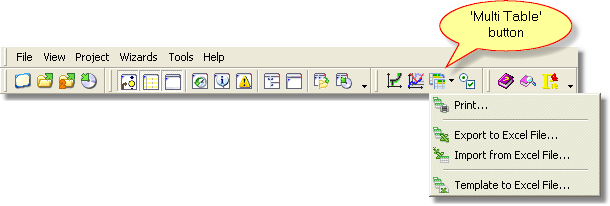
A pop up menu will appear containing individual Multi Table functionalities (modes):

➢  Export multiple tables from Ple4Win to Excel
➢  Import multiple tables from Excel to Ple4Win
➢  Create an empty Excel input file (Template)
The working process of all Multi Table modes is more or less the same. In all 4 modes, a selection can be made which tables should be, respectively printed, exported, imported or created. When printing or exporting multiple tables, it is also possible to specify which rows of the table need to be printed or exported. For example, table rows containing the maximum, minimum or both (extreme) values. Finally, the output sequence of the tables can be specified as well (also available when generating Excel input file). More detail information of this process can be found in Multi Table Process.
Settings defined in all Multi Table modes can be stored as a 'Multi Table Definition'. Each definition contains parts of settings that can be reused in other modes. This means that Ple4Win users can build up libraries of reusable definitions that can be accessed very easily in other Multi Table modes.
 These functionalities are only available if the Communication (E) module is present.
MultiTable, last changed: 14/09/2016
See also: